
You can keep Windows in French, German or your preferred language and still use TheIsleMinimap's screen reading. The part that matters is whether Windows has the English recognition support the app requests for Asset Location. Your country and display language are not, by themselves, a reading error.
Open the app's Get started assistant and choose a screen-reading mode. If English support is missing, select Install English OCR support. The app adds the required English components; your Windows display language stays unchanged.
The cover is an AI-generated explanation graphic, not a Windows dialog or an app screenshot. The images within the steps are actual app screenshots.
OCR recognizes visible text; it does not translate your game
OCR means optical character recognition: software reads characters from an image. The Isle displays the Asset Location, Lat and Long text in English. TheIsleMinimap requests an English recognizer for that on-screen text rather than relying on your Windows interface language.
Windows treats OCR as a language feature. Installing a display language and having its recognition components available are related, but they are not the same check. A PC with English already available can be ready immediately; another PC may need the component added first.
Microsoft documents OCR as a language Feature on Demand, with a dependency on the matching Basic language component. The app's installer requests the required English Basic and OCR components. It does not change your regional number format or remove your existing languages.
Open Get started and select your update method
- Open Settings > Position Updates.
- Select Get started, or Continue setup if you already began the assistant.
- Work through the appearance, interaction and Earplugs preferences until you reach the position-update choice.
- Choose When I press Tab or Automatically. If you assigned another game key, the key-based option reflects that choice.
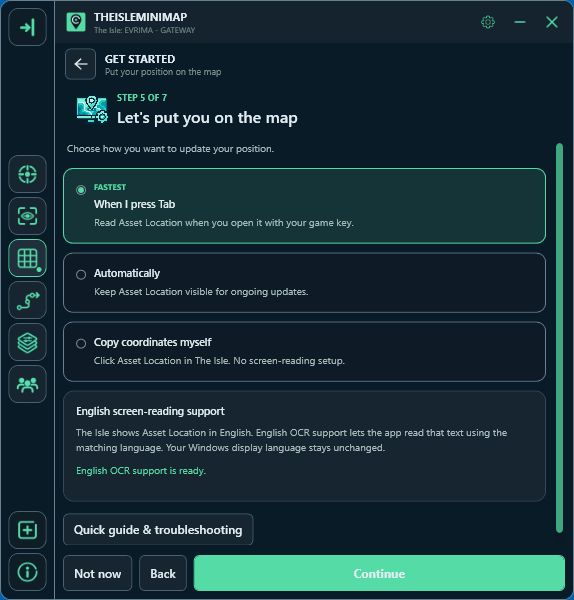
- Read the English screen-reading support result shown by the assistant.
Both screen-reading choices use English OCR. The check runs when you select one of them; you do not need to guess what is installed from the language shown on your Start menu. If the result says support is ready, continue with setup. An installation button is not needed when the check already succeeds.
Install missing English support from the assistant
If the panel says English OCR support is missing, choose Install English OCR support. Windows may ask for administrator approval. Approve the app's installation request when you are ready to add the component, and keep TheIsleMinimap open while Windows finishes.
The download needs an internet connection and can take several minutes. The app checks availability again after a completed installation. If Windows reports that a restart is required, restart when ready, then reopen the app and continue the assistant. It does not force an automatic Windows restart.
You do not need to select English as the Windows display language, uninstall French or German, or replace your keyboard layout. If you cancel the permission prompt, the installation does not proceed; you can return to the assistant and try again later.
English support is one part of screen-reading setup
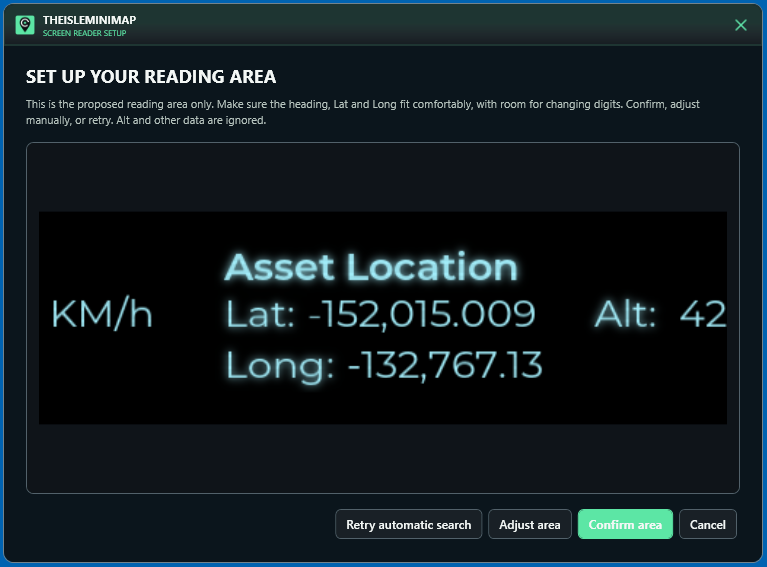
A successful language check means the recognizer is available. The app still needs a reading area that contains the game's actual coordinate text.
- Open The Isle's panel where Asset Location is visible.
- Use Find automatically in the screen-reader setup.
- Check the proposed area. Keep the heading, Lat and Long inside it, with room for the digits to change.
- Confirm the area and complete any permission or app-restart step requested for your selected mode.
- Return to the game and test a fresh location update.
For the key-based mode, use the key that opens your Asset Location panel; Tab is the default. Automatic mode needs the coordinate area to remain visible for ongoing readings. Neither mode can read the coordinates while that game panel is hidden.
The complete screen-reading guide covers mode choice, game-key settings and area troubleshooting.
What to check if installation cannot finish
- The check cannot complete: use Check again. A failed check is not the same result as a confirmed missing component.
- The download fails: check your internet connection and whether Windows Update can download components, then try again.
- You declined administrator approval: return to the installation step when you are ready to approve it.
- Windows requests a restart: finish that restart before repeating the support check.
- The computer is managed by an organization: component installation may be restricted. Ask its administrator instead of changing security or update policies yourself.
Microsoft's Windows OCR language guidance also distinguishes installed recognition support from missing language packs and notes that adding a pack can take several minutes. You do not need to install PowerToys to use TheIsleMinimap.
If support is ready but the marker still does not update, check the approved reading area, the visible game text and your selected game key next. Reinstalling English repeatedly will not correct an area that is aimed at the wrong part of the screen.
Use clipboard updates while you sort out OCR
In the assistant, choose Copy coordinates myself. Open Asset Location in The Isle and click it to copy the coordinates. TheIsleMinimap recognizes the copy and updates the map; you do not need to paste it into another field. This method does not use English OCR or a screen-reading area.
You can return to Settings > Position Updates later to set up screen reading. If the problem continues, include the support-check message, your Windows version and the step that failed in a support ticket. Keep passwords and license keys out of screenshots.
English OCR questions
Do I need an English Windows installation?
No. The app adds recognition support without switching the Windows display language.
Does every French or German PC need the component installed?
No. Some already have working English support. Use the app's check rather than assuming from the display language.
Does installing English support make the marker follow me with the game panel closed?
No. Screen reading still needs the visible Asset Location text.
Can I keep using manual coordinate copies?
Yes. That update method does not require the OCR component.