

Explore 01
A private group code
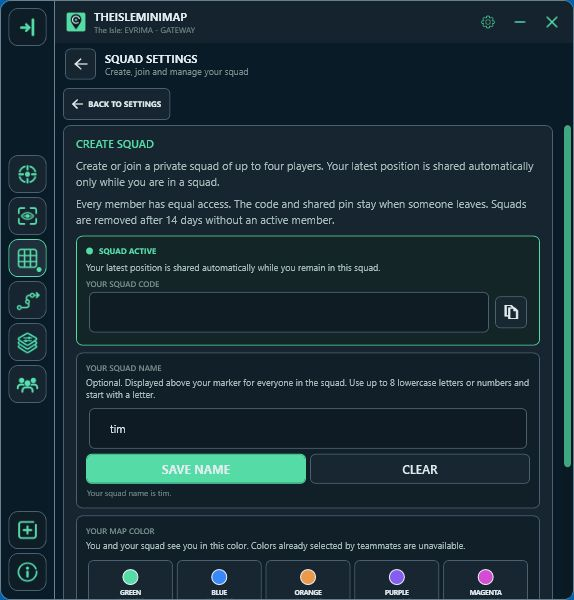
- Create or joinCreate a private squad, or enter the code a friend shares with you.
- Invite your groupCopy the code and share it directly with up to three friends.
- Update your positionYour screen reader or clipboard updates supply your latest shared position.
One player creates a squad and shares its code directly with up to three friends. There is no leader, and every member has equal access. The main-screen squad counter shows whether you are connected and how many members are currently present. Clicking it opens Squad Settings directly.
If you are not in a squad, the counter shows 0/4 and uses a neutral label so it cannot be confused with the app’s connection status.
The map shows the latest position supplied by each member, rather than continuously reading their game. Complete movement trails stay on each player’s own PC.
Explore 02
Staying in a squad
Leaving removes your own membership. The remaining members keep the squad code and shared pin, even when the person who created it leaves. When your Squad access ends, your slot is freed automatically. Temporary connection problems do not remove your saved squad.
A squad is removed after 14 days without an active member. A Monthly or Quarterly subscriber can separately manage their three shared licenses in Account Portal > Licenses; that does not give them leadership of the in-app squad.

Explore 03
Personal colors and optional names
Your marker color
Choose from ten colors. A color already in use becomes unavailable to the other members.
An optional short name
Use up to eight lowercase letters or numbers, starting with a letter.
Each member can choose an available marker color from Green, Blue, Orange, Purple, Magenta, Cyan, Yellow, Lime, Red and Pink. A color already used inside the squad becomes unavailable to the other members. Everyone—including you—sees your selected color.
You may also choose an optional lowercase name of up to eight letters and numbers. It must start with a letter. When present, the name stays attached above the matching position marker as the map moves and zooms.

Explore 04
One shared destination
Place one destination
Right-click the map to put a destination pin on the shared view.
Stop sharing
Leaving frees your own slot. The remaining members keep the squad and shared pin.
Right-click the map to place one destination pin for the entire squad. Any member can use the shared point to coordinate a route and remove it when the plan changes. Each member’s full movement trail remains private on their own device.
Squad features are included with Squad Quarterly, Squad Monthly and Squad Lifetime. Solo Lifetime includes local navigation, its own marker color and up to three personal pins; it does not include online squads.