

Location names
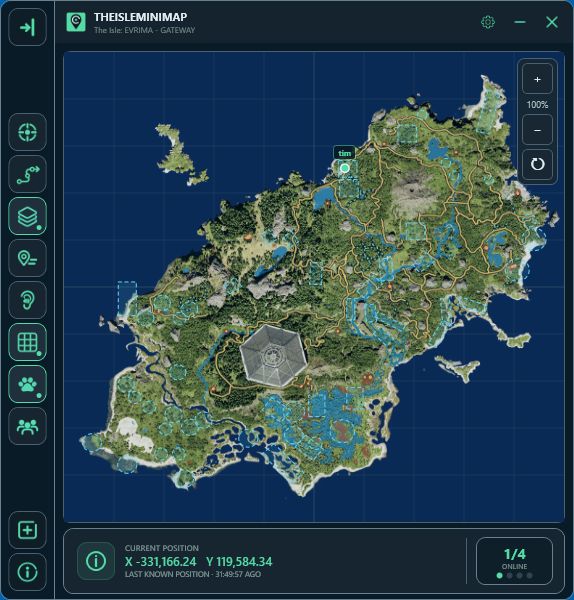
Recognize named Gateway areas and orient your route.
The Gateway layer catalog
Choose exactly what belongs on your map. Browse every navigation layer, animal filter, plant resource and Earthworks marker.

01 / General · 11 layers
Navigation labels, areas and paths. Switch on one layer or build a view with all eleven.
Recognize named Gateway areas and orient your route.
Use mapped landmarks as reference points while navigating.

Find mapped water references and compare them with your position.

Display mapped sanctuary boundaries.
See mapped migration and mass-migration areas.
Display the mapped patrol regions on Gateway.

Show mapped air-current paths and updraft areas.

Distinguish roads and smaller trails when planning a route.
Locate mapped mud-pool footprints.

Find mapped salt-lick reference points.

See cave locations and mapped entry points.
The map grid is a separate control in Map Settings, so you can keep it on without enabling other layers.

02 / Animals · 12 filters
Separate land and aquatic references. Every species below has its own filter in the app.
Animal markers show mapped spawn and sighting references. They do not track live animals, players or current server activity.

03 / Plants · 26 filters
Six resource families, with individual filters for every mapped plant and diet item.

04 / Earthworks · 2 filters
Keep Earthworks separate from plant and animal layers.
Display mapped gastrolith resource locations with their own marker and filter.
Show mapped clam-rock resource locations independently from gastroliths.
In Map Layers Settings
Switch between General, Animals, Plants and Earthworks. Enabling one group does not enable the others.
Use Enable All / Disable All for the selected group, or choose only the filters you need. Filters remain visible but unavailable while their group is off.
Layers are mapped Gateway references. Resource availability and zone activity can change in-game; the map does not confirm live spawns or active server conditions. Check for app updates as map data changes.