
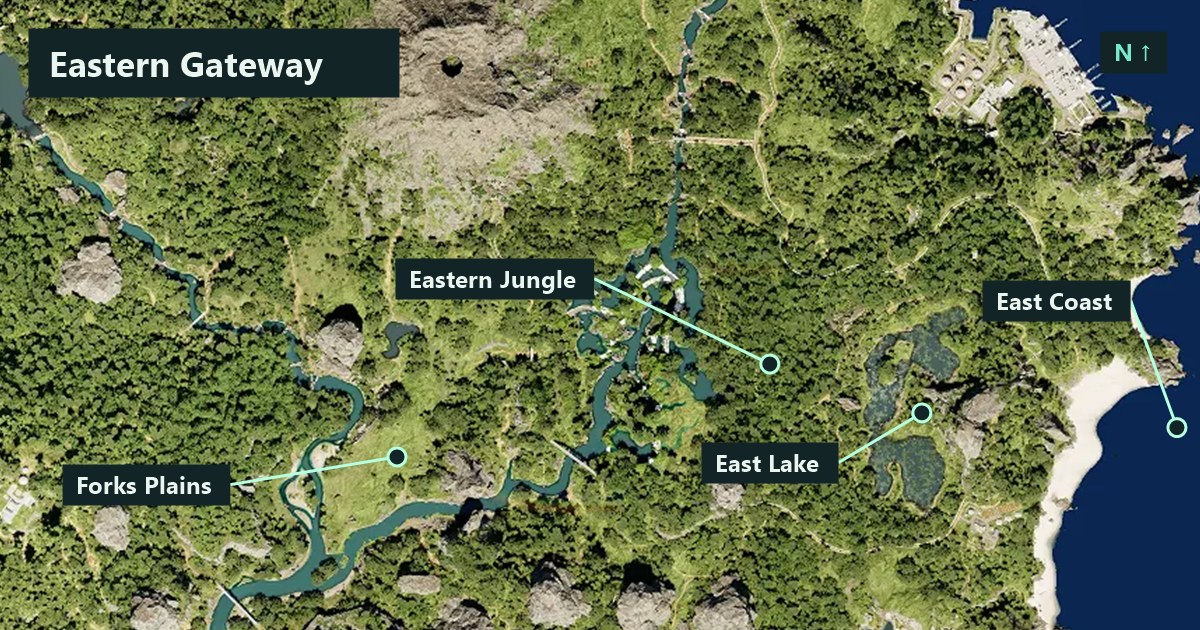
East Lake and Eastern Jungle are separate named references on Gateway. On TheIsleMinimap’s north-up map, the East Lake label lies southeast of the Eastern Jungle label. Locate both names before choosing a direction, then narrow the destination to a shore, clearing or approach you can recognise in the game.
The cover uses the app’s Gateway map and the coordinates from its built-in location layer, checked on November 20, 2026. The lines connect labels to their reference points. Inspect the ground as you travel to choose an approach that suits your dinosaur.
Locate East Lake and Eastern Jungle
Open the map at a wide enough zoom to see eastern Gateway. Under Settings > Map Layers > General, enable Location names. Find the complete names and your latest position before zooming closer. East Lake is a different reference from North Lake, so keep the direction in the name when you describe it to friends.
| Reference | Relative label position | What to clarify |
|---|---|---|
| Eastern Jungle | Northwest of the East Lake label. | Which edge or recognisable feature are you heading toward? |
| East Lake | Southeast of the Eastern Jungle label. | Which shore or approach is the destination? |
| East Coast | East of the East Lake label. | Are you going to the coast or stopping at the lake? |
| Forks Plains | West of both the Eastern Jungle and East Lake labels. | Is this the direction you are coming from or where you plan to stop? |
These directions describe the label references on the app’s map. Use them to get your bearings, then choose the next leg by checking the terrain and your animal’s condition. The Gateway beginner map guide explains how to turn a wide map view into a shorter journey.
Identify your approach before asking friends to move
Get a fresh Asset Location update so you can compare your dot with the two labels. If the map has been zoomed or panned, reset the view and locate the area again. Think about whether your current approach reaches the jungle first, the lake first or the coast farther east. That is useful context when another player is trying to meet you.
Give a location and a direction in the same message. For example, “I’m coming toward East Lake from the jungle side. I’ll stop before reaching the shore.” Your friend can then tell you whether they are approaching the same side. Check each other’s fresh positions before making either player travel farther.
Choose a shore reference you can use
As you reach the lake area, pause where you can inspect the bank and the route back. Look for a feature both players can describe, such as the edge of a clearing or the point where you left the trees. Specify that feature when arranging the final approach. A lake name alone can still send two players to different parts of the shore.
If the purpose of the trip is drinking, look around before committing to the water’s edge. Check where you will step back to and whether the terrain allows that movement. If the bank is busy, keep your orientation and pick another approach or wait farther back. The water guide develops the same observation routine.
Keep a reference while travelling through Eastern Jungle
In thick vegetation, take shorter legs between places you can recognise. After a turn, refresh your position and check whether you are still moving toward the same destination. If the ground forces you sideways, pause at the next visible reference and reassess before making another long leg.
Keep the map focused on the decision you are making. Location names help establish the wider area, while other filters can help inspect the next objective. Turn down visual clutter if it makes your own marker difficult to pick out. The zoom, pan and Follow Player guide explains how to inspect ahead and bring your marker back into view.
Agree on a meeting point and fallback
Choose the landmark or shore approach, the side where you will wait and one fallback you have already passed. In a private squad, place the shared destination at the agreed waiting point. Ask everyone to acknowledge a change before replacing it. That keeps a late position update from being mistaken for a new instruction.
A Solo personal pin can save a useful reference for your own next visit. It stays on your computer as you move. The map marker guide shows the difference between those pins and a squad’s shared destination.
A short routine for your next visit
- Locate East Lake, Eastern Jungle and your freshly updated dot in one view.
- Choose whether the next stop is a jungle reference, a shore approach or somewhere farther east.
- Inspect the approach in the game and keep enough reserve for the return.
- If meeting friends, name the waiting place and the side you are on.
- Refresh positions after changing direction and confirm any new destination together.
Once the first short leg is familiar, you can extend the trip around a new resource or landmark. A route you understand in both directions gives you more options when visibility, supplies or nearby players change.